
Tracking shows 'Delivered' but the package isn't there. Before you assume theft, rule out a misdelivery: drivers sometimes leave a parcel at the wrong house, especially on streets with similar house numbers. Check the property and your neighbors, and note your platform's reporting deadline at the same time.
Most 'delivered but missing' situations resolve within 24 hours. Either the package appears, or a quick call to the carrier locates it. Follow these steps in order.
First: Wait 24 Hours If Possible
Sometimes carriers update tracking to 'Delivered' a few hours before the actual delivery. USPS asks you to wait until more than one postal business day has passed since the 'delivered' scan before you send it a service request. If the tracking just updated to 'Delivered' in the last few hours, wait until the next day to see if it appears.
Waiting is the right first move and it is not a free move. Most parcels marked delivered turn up within a day, so a short wait resolves the majority of cases without a claim at all. The cost is that the platform windows in The Claim Clock table below are already running, and on the tightest of them a two day wait is a meaningful share of the total.
Use the wait rather than just passing it. Check your order page for a delivery photo, note the exact timestamp on the delivery scan, and screenshot both. If the parcel does appear, you have lost nothing. If it does not, you begin the claim with evidence already gathered instead of starting from zero on day three.
The one situation where waiting is wrong is a purchase on a platform with a very short reporting window. On those, report first and withdraw the report if the parcel arrives. Reporting early costs you nothing. Reporting late costs you the claim.
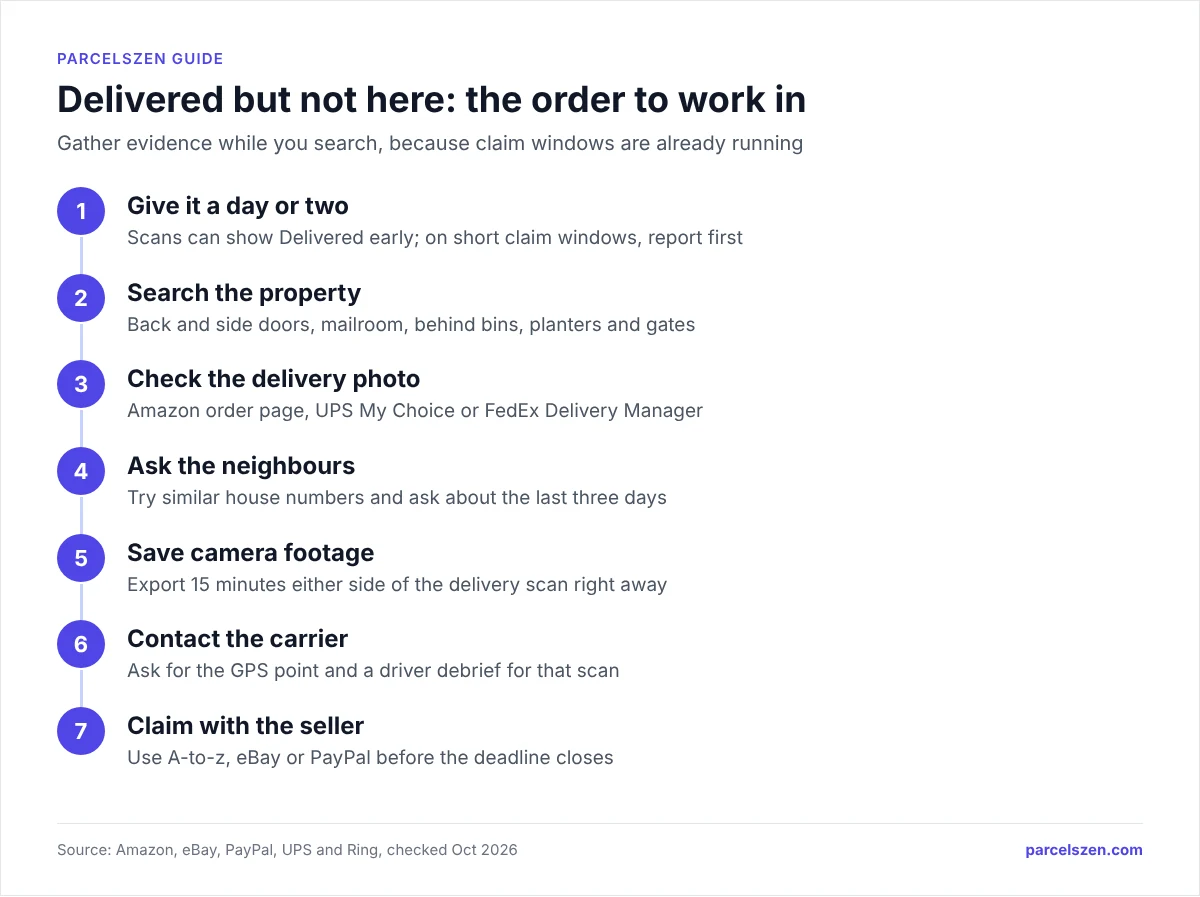
Step 1: Search Thoroughly
Search these locations before contacting anyone:
- Front porch, back porch, side door
- Mailbox, including a parcel locker in your mailbox cluster
- Behind plants, in a planter, or in a discreet location (many carriers leave packages in less obvious spots to deter theft)
- With a neighbor, because the carrier may have delivered to the wrong address
- Building lobby, mail room, or package room if you're in an apartment or condo
- Your building's superintendent or concierge
- In your garage if it was left open
Drivers hide parcels from the street, not from you. The logic is concealment, so look where a parcel would be invisible to someone walking past: behind the bin, under the doormat, inside a recycling box, behind a planter, tucked beside the meter cupboard or over a side gate.
Check the back and side of the property even if you never use those doors. A driver who finds the front exposed will often try around the side, and on a corner plot they may treat a side entrance as the front. If you have a garage, look inside the garage door recess.
Look up as well as down. Parcels get left on window ledges, on top of meter boxes and inside porch roofs where they are hidden from below. This costs two minutes and resolves a large share of cases before any claim is needed.
Step 2: Check for a Delivery Photo
Most major carriers now take a photo of the delivery location. Amazon Logistics, UPS, and FedEx in particular provide delivery photos.
- Amazon: Check your Amazon order page for a delivery photo
- UPS: Check the UPS My Choice app or email notification for a delivery photo
- FedEx: Check FedEx Delivery Manager for a photo
The photo often shows exactly where the package was left, which can help you find it or confirm it was delivered to the wrong address.
Check Your Package Status
See the carrier's scan history on ParcelsZen, including the time of the delivery scan.
Check Package StatusThe photo is evidence, so treat it as evidence. Save it before you contact anyone. Carriers keep delivery photos for a limited period and some retailers show them only inside the order page, which can become inaccessible once a refund is processed or the order is archived.
Read the background, not the parcel. The parcel in the photo tells you almost nothing. The door, the step, the paving, the house number and the plants tell you whether it is your address. A photo of a door that is not yours is the strongest possible evidence for a claim, and it converts an argument about whether the parcel arrived into a simple misdelivery.
No photo is also information. UPS (through UPS My Choice) and FedEx (through FedEx Delivery Manager) can show a photo of a delivery. If either recorded a delivered scan with no photo, the parcel may have been handed to a person, left somewhere the driver could not photograph, or scanned before the actual drop. Say exactly that when you contact the carrier.
Step 3: Check With Neighbors
Misdelivered packages are surprisingly common. Knock on doors of houses with similar address numbers (e.g., 123 vs. 1230 Main Street) or nearby buildings.
Post a message in a neighborhood app (Nextdoor, Ring Neighbors). Someone may have your package and not know how to return it.
Ask about the last three days, not just today. Neighbours who accept a parcel often set it aside and forget, particularly if they were expecting nothing themselves. A parcel scanned as delivered on Friday can surface on Monday from a house two doors down.
Check the number before the name. Most misdeliveries are a transposed house number rather than a wrong street. If you are at 42, try 24 and 42a before widening the search. In flats, the parcel room, the concierge desk and the post room are three different places and staff frequently check only one.
Step 4: Check Camera Footage
If you have a Ring doorbell, Nest camera, or security camera, review the footage from the delivery time shown in the tracking. This can confirm whether a package was delivered and whether anyone picked it up afterward.
Match the footage to the scan timestamp, not to your memory of the day. The delivery scan carries a precise time. Pull the fifteen minutes either side of it rather than scrubbing through hours, and check the whole window, because drivers sometimes scan from the vehicle before walking up.
Export the clip immediately. Ring, Nest and most consumer systems delete footage on a rolling cycle, commonly thirty to sixty days depending on the plan, and some keep nothing at all without a subscription. By the time a claim reaches the stage where footage matters, the footage may be gone.
Footage showing no delivery is stronger than footage showing a theft. If the camera covers the approach and no vehicle appears in the window around the scan, that supports a misdelivery or a false scan, which the carrier is responsible for. A recorded theft after a genuine delivery usually shifts the matter to the retailer or your insurer instead, because the carrier completed its contract.
Step 5: Contact the Carrier
- USPS: Call your local post office with the tracking number. Ask the carrier's specific route supervisor to investigate, because delivery can be confirmed with the exact mail carrier who made the drop.
- UPS/FedEx: Call customer service and request a delivery investigation. They can contact the driver directly and review GPS data from the delivery vehicle.
- Amazon Logistics (TBA tracking): Contact Amazon customer service, which can pull driver GPS and delivery photo data.
Quote the scan, not the story. Give the carrier the exact delivery timestamp and ask whether the driver's scanner recorded a location at that scan. A location on a different street is direct evidence of a misdelivery.
Ask for the driver debrief. Carriers can contact the driver who made the scan and ask where the parcel was left, and this frequently produces an answer within a day. It is a specific request that agents recognise, and it works better than asking them to open an investigation.
One thing to know before you invest time here: on a parcel marked delivered, USPS insurance on Priority Mail generally does not pay out, because the service was recorded as completed. That makes the retailer or marketplace the more productive route in most cases, and it is why the claim windows in the table above matter more than the carrier process.
Step 6: File a Claim or Request a Refund
If the package cannot be located after the above steps:
- Contact the seller or platform you bought from and report the package as missing
- Most platforms have buyer protection for 'delivered but not received' cases: Amazon A-to-z Guarantee and PayPal both cover this
- Be honest and specific: explain what your tracking shows, when it was supposedly delivered, and what you found when you checked
Go to the retailer before the carrier, in almost every case. Your contract is with the shop, not with the courier who was hired by the shop. The retailer can open a carrier investigation you have no standing to open yourself, and it can refund or replace immediately without waiting for the outcome.
State the facts in the order that matters: the tracking number, the exact delivery timestamp, that the item was not received, what you have already checked, and whether a delivery photo exists and what it shows. With those five facts in the first message, the retailer has what it needs to open a carrier investigation or refund you.
If the retailer refuses, escalate on the platform rather than arguing. The marketplace decides these cases on evidence, not on who was more persistent, and the deadlines in the table above are the real constraint. Escalate while the window is open, even if the seller has promised to look into it.
The Clock Nobody Tells You About
Every guide on this subject tells you to wait 24 to 48 hours before acting. That advice is sound for finding the parcel and wrong for protecting your money, because on most platforms the countdown started the moment the carrier pressed "delivered".
The windows are shorter than people expect and they run on different clocks. Some count from the delivery scan, some from the estimated delivery date, and one counts from the day you paid.
| Where you bought it | Deadline to report | What the clock counts from |
|---|---|---|
| eBay Money Back Guarantee | 30 calendar days | The estimated or actual delivery date |
| Amazon A-to-z Guarantee | Eligible 3 days past the latest estimated delivery date, or once tracking shows delivery, if you contacted the seller more than 48 hours earlier; the deadline to file is 90 days after the latest estimated delivery date | Estimated delivery, or the delivery scan |
| PayPal Buyer Protection | 180 days to open, but only 20 days to escalate | The day you paid |
| Amazon Pay (third-party sites) | Wait 15 days, then 75 days to file | The order date |
| Card chargeback | Typically 120 days | The transaction date |
🛒 eBay
📦 Amazon A-to-z
💳 PayPal
Three traps inside those numbers
PayPal closes your dispute if you do not escalate it. Opening a dispute is not filing a claim. You have 180 days to open one, but once open you have roughly 20 days to escalate it to a claim, and if you let that pass while waiting for the seller to reply, the dispute closes permanently. You cannot reopen it.
A chargeback cancels your Amazon claim. If you ask your bank to reverse the charge, Amazon will not process an A-to-z claim on the same transaction. Pick one route. Most buyers try Amazon first because it is faster and does not put the card account into a dispute process.
Amazon's eligibility opens before the parcel is even late, and the filing window stays open for 90 days after the latest estimated delivery date. The rule is three days past the latest estimated delivery date or a delivery confirmation on the tracking, whichever is sooner, and you must have contacted the seller more than 48 hours earlier. Eligibility opening is not the window closing: you still have ninety days from the latest estimated delivery date to file.
Work Out Your Next Step and Your Deadline
The right action depends on three things: where you bought it, how long ago the delivery scan happened, and whether a photo exists. Answer those and this works out which deadline applies to you and what to do before it closes.
The tool assumes a standard consumer purchase. Business accounts, freight and marketplace-fulfilled orders can carry different terms, and a seller's own returns policy can be longer than the platform minimum. Where the two differ, the longer one usually applies.
Is It Package Theft?
Treat it as theft when the evidence points that way: a delivery photo of your own door, or camera footage of someone taking the parcel after the driver left.
If you believe theft occurred:
- File a police report, because many carriers and insurance companies require this for theft claims
- Report it to your carrier's customer service
- Consider preventative measures: Amazon Locker, UPS Access Point pickups, or a Ring doorbell
If you choose an Amazon Locker at checkout, the driver puts the parcel in a locked compartment and you collect it with a pickup code, so it never sits on your doorstep. A locker delivery can still be late or mis-scanned, so keep the tracking number until you have the parcel.
Frequently Asked Questions
Quick Reference: 'Delivered' But Missing Checklist
Find the exact time of the delivery scan on ParcelsZen. Armed with that, check doorbell camera footage from that time window. If the footage shows a delivery happening, you know when it was dropped, and that changes which step you take next.
- Wait: Up to 24 hours to search, but check your platform deadline the same day
- Search: All delivery locations including discreet spots
- Photo: Amazon order page, UPS My Choice, FedEx Delivery Manager
- Neighbors: Similar address numbers + Nextdoor / Ring Neighbors
- Camera: Ring / Nest footage from delivery time
- Carrier: USPS local post office / UPS-FedEx delivery investigation (GPS review)
- Claim: Amazon A-to-z / eBay Money Back / PayPal Item Not Received
- Theft: File police report → carrier claim → doorbell camera for future
Sources
Official pages this guide relies on, checked in October 2026.
- A-to-z Guarantee (Amazon)
- eBay Money Back Guarantee policy (eBay)
- Dispute filing timeframes | PayPal US (PayPal)
- How do I escalate a PayPal dispute to a claim? | PayPal US (PayPal)
- Amazon Pay A-to-z Guarantee for buyers (Amazon Pay)
- View and Track All Shipments With UPS My Choice® | UPS - United States (UPS)
- Adjusting your video storage time (Ring)