
A 'Delivery Exception' scan means the delivery left its planned path: a missed signature, a locked entrance, a weather delay. The reason the carrier adds to the scan tells you whether anyone has to act, and the next scan shows whether it has cleared.
Weather, emergency and mechanical exceptions need no action from you; access, signature and address exceptions do. This guide covers the seven exception types you are most likely to see and who has to act on each.
What Is a Delivery Exception?
A delivery exception means an unexpected event occurred during the delivery process that resulted in your package not being delivered as planned. The word 'exception' in logistics terminology simply means 'deviation from the standard process', and it does not necessarily mean something is wrong.
Enter your tracking number on ParcelsZen to see the tracking updates, including any exception and the reason the carrier gave, and the scans that follow it.
The word exception is logistics vocabulary, not a warning. It means a deviation from the expected process, in the same sense a database logs an exception. Carriers use it internally and the term reached customer-facing tracking without ever being translated.
An exception can be logged anywhere, not just at your door. A sorting hub, a customs facility, a road closure or a failed delivery attempt all produce one. This is why a parcel can show an exception while still hundreds of miles away and still arrive on the original estimated date.
It is not a lost parcel and rarely becomes one. The shipment remains inside the carrier network and attached to the same tracking number, and the next scan shows whether the exception has cleared. The status asks you to check the reason, nothing more.
What Each Carrier Calls It, and Who Has to Act
USPS never uses the word exception. If your parcel is with USPS you will search for that term and never find it in your tracking, because USPS logs the same events under Alert followed by a plain description. That single fact resolves a large share of the confusion around this subject. UPS shows the label Exception and puts the reason in the Shipment Progress section of the tracking page, and carriers reword these reasons from time to time, so treat the wording in the table below as typical examples checked on 11 Oct 2026.
| What you see | Carrier | Who has to act |
|---|---|---|
| Alert: Weather Delay | USPS | Nobody. It clears on its own |
| Alert: No Access to Delivery Location | USPS | You. Gate code or instructions |
| Alert: Insufficient Address | USPS | The sender. You cannot amend it |
| Exception: Emergency Conditions | UPS | Nobody. Weather or a road closure |
| Exception: A mechanical failure occurred | UPS | Nobody. A vehicle or facility fault |
| Exception: Incorrect Address | UPS | The sender |
| Delivery exception: Recipient not available | FedEx | You. Sign or reschedule |
| Shipment exception | FedEx | Depends on the reason appended to it |
😌 Nobody has to act
🙋 You have to act
📮 The sender has to act
The vocabularies differ more than the events do
FedEx uses two labels where the others use one. A shipment exception is logged anywhere in the network, while a delivery exception is specific to the final leg, and FedEx appends short internal codes to some of them. UPS uses a single word, Exception, followed by a phrase such as Emergency Conditions or Security Delay.
So the same real event produces three different tracking strings. A snowstorm reads as Alert: Weather Delay at USPS, Exception: Emergency Conditions at UPS, and Delivery exception with a weather reason at FedEx. Searching the exact phrase you were given is more useful than searching the general term.
The only question that matters
Read the reason, not the label, and sort it into one of three buckets. If nobody can act, waiting is the correct response and calling achieves nothing. If you can act, doing so today usually prevents a second failed attempt. If only the sender can act, every hour you spend on the carrier is an hour wasted.
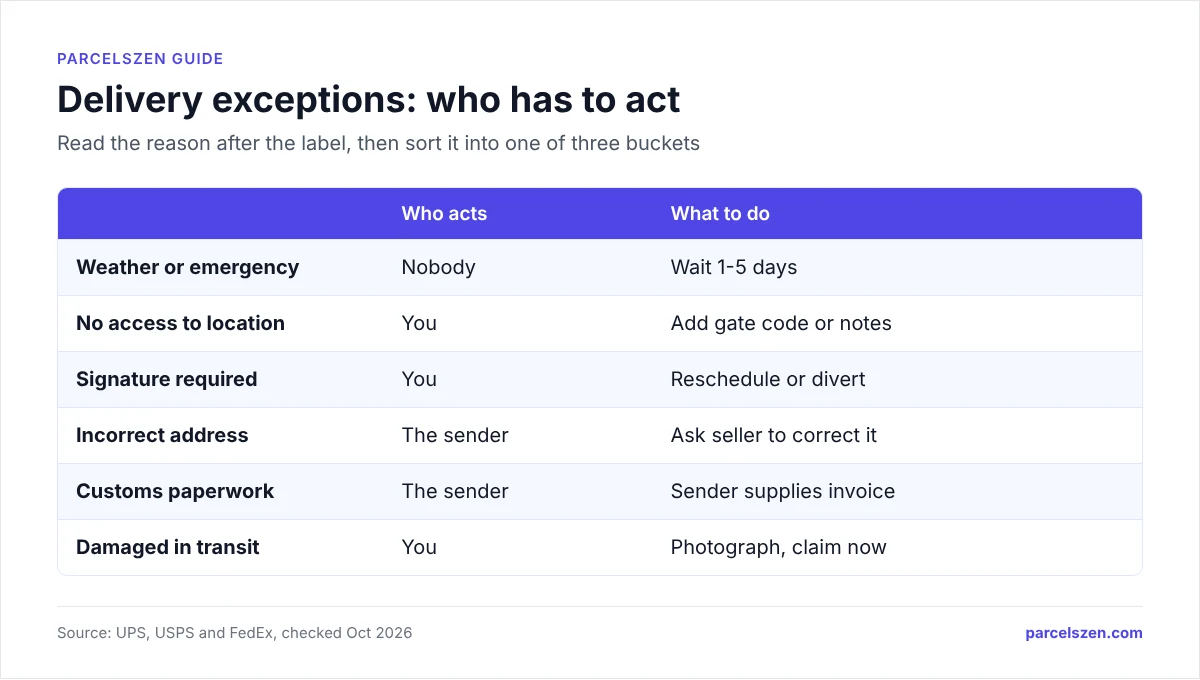
An exception is a prompt, not a verdict. The status is a triage prompt rather than a declaration that anything is lost: sort it into one of the three buckets above and act only if the bucket is yours.
Exception Type 1: No Access to Delivery Location
What it means: The driver couldn't reach your delivery location: a locked gate, a secured building without access code, or a location that requires a keycard.
What to do:
- Leave a note with your access information for the carrier at the entrance
- Contact the carrier to arrange a different delivery time or location
- For UPS: Use UPS My Choice to provide delivery instructions
- For FedEx: Use FedEx Delivery Manager
- For USPS: Call your local post office
This is the exception you are most able to fix, and the one most people ignore. A locked gate, a security door, an unlisted apartment number or a dog in the yard all produce it, and every one of them is solved by information the driver does not have.
Add the detail at the carrier, not at the retailer. A note typed into an order form usually never reaches the handheld device the driver reads. Delivery instructions saved in UPS My Choice, FedEx Delivery Manager or USPS Delivery Instructions do reach it.
Be physical and specific. "Gate code 4821, package behind the blue bin left of the gate" is a set of instructions a stranger can follow in seconds. "Please deliver carefully" changes nothing. If the same exception repeats, the instruction was not the problem: the parcel is being routed to an address the driver genuinely cannot reach.
Exception Type 2: Recipient Not Available / Signature Required
What it means: The package requires a signature and no one was home to sign.
What to do:
- Check for a delivery notice card left by the driver, because it will have instructions for pickup or redelivery
- Use UPS My Choice or FedEx Delivery Manager to reschedule delivery for a time you'll be home
- Authorize delivery without signature through the carrier's app (only available for some signature levels)
- Pick up from a carrier location
Check Your Exception Status Now
See the tracking updates and any new delivery date the carrier has published on ParcelsZen.
Check Exception StatusA signature requirement is set by the sender. For a basic signature, FedEx Delivery Manager lets you sign online in advance and UPS My Choice lets you authorize release, but an adult or direct signature needs someone at the door. Retailers apply it to high-value goods, age-restricted items and anything they insure, and the driver cannot leave it on the strength of a note.
Two options exist and both take about a minute. Reschedule to a day you are home, or divert the parcel to an access point, service point or Post Office where you collect it with identification. Both are available from the carrier app, and both are faster than waiting for three attempts to fail.
USPS signature requirements come from the sender. A registered digital signature lets USPS deliver eligible items that need a signature (Priority Mail Express, Signature Confirmation and items insured for over $500) while you are out. For other items that need a signature, schedule a redelivery or collect the parcel at the Post Office named on the notice.
Exception Type 3: Incorrect or Insufficient Address
What it means: There's a problem with the address on the package: a missing apartment number, wrong zip code, illegible writing, or the address doesn't exist.
What to do:
- Contact the sender with the exact exception wording and your full address, and ask them to correct it with the carrier
- Contact the sender to verify what address was on the shipping label
- If the address error is significant, the package may be returned to sender, so act quickly
Address exception packages are returned to sender if not corrected quickly. Contact the sender the same day you see this exception to prevent a return.
You cannot fix this one, and that is the single most useful thing to know about it. The address on the label came from the sender, and carriers will not accept an amendment from the recipient because they have no way to verify you are entitled to redirect someone else's shipment.
Contact the seller with the exact wording of the exception, not with a request to change the address. Ask them to file a correction with the carrier and supply the complete address including apartment or unit number. That is a request they can complete; a change request from you will be declined.
Act on the same day. Carriers commonly attempt delivery two or three times before returning a parcel to the sender, and an address that failed once will fail again. Once it has been returned, you are waiting on a fresh dispatch rather than a correction, which adds a week or more.
Exception Type 4: Weather Delay
What it means: A storm, hurricane, blizzard, or other weather event has disrupted carrier operations in your area or along your package's route.
What to do: Nothing, because weather delays resolve themselves. Once conditions improve, delivery will resume. Expect 1-5 additional days of delay depending on severity.
This is the exception that requires nothing from anyone. Severe weather, flooding, wildfire and road closures stop networks in the affected region, and delivery resumes automatically once operations return to normal. Calling the carrier will not move a parcel that a road closure has stopped.
Expect one to five days depending on severity, and expect a backlog after it clears rather than an immediate return to schedule. The parcels that built up during the closure have to move before yours does, so the delay usually outlasts the storm itself.
Weather also suspends service guarantees. Carriers exclude events outside their control from money-back guarantees, so an express parcel delayed by a hurricane will not refund the express fee. That is worth knowing before spending time on a claim that cannot succeed.
Exception Type 5: Customs Delay
What it means: For international packages, the package is held in customs processing.
What to do: Check for any notification from the carrier or customs asking for payment or documents. If nothing is asked of you, the parcel is waiting in the customs queue, and the next scan will show when it is released.
A customs exception is silence with a label attached. The parcel is physically stationary at a border facility and no carrier scan is generated while it sits there, so the exception status is often the only indication anything is happening at all.
Whether you can act depends entirely on the reason. If duty is owed, you clear it by paying, and the parcel moves within a day. If paperwork is missing, only the sender holds the commercial invoice and the harmonised code, so the request has to go to them. If it is a routine queue, nobody can accelerate it.
Our guide to a package stuck in customs sets out which of the five hold types you have and who is able to act on each. That distinction matters more here than the exception label, which tells you only that something happened.
Exception Type 6: Package Damaged During Transit
What it means: The carrier detected damage to the package during handling.
What to do: When the package arrives, document all damage with photos before opening. If contents are damaged, file a claim with the carrier immediately. If the package is so damaged the carrier is holding it, you'll receive a notification with instructions.
Damage exceptions are logged by the carrier, not reported by you, which means the carrier has already seen the problem and decided the parcel cannot continue in its current state. That is why this one occasionally resolves as a return to sender rather than a delivery.
Photograph everything if it does arrive. The outer packaging, the label, the void fill and the item, before anything goes in the bin. Damage claims are decided on evidence of how the parcel was packed as much as on the damage itself, and packaging discarded on day one cannot be photographed on day three.
Damage claims have no waiting period. Unlike a loss claim, you can file at once, and you should, because the clock is already running: USPS and FedEx count 60 days from the mailing or shipment date for US damage claims, and UPS counts 60 days from the scheduled delivery date. Report it to the retailer the same day, since they hold the contract and can replace the item without waiting for the carrier to decide.
Exception Type 7: Attempted Delivery, Package Not Accepted
What it means: Someone at the delivery address refused the package. If you didn't intentionally refuse it, someone else may have.
What to do: Contact the carrier to clarify and request the package be re-delivered. If the refusal was intentional (you want to return an item), contact the seller to arrange a return.
Frequently Asked Questions
Will My Package Still Arrive After an Exception?
Yes. Address exceptions don't wait: contact the sender the same day you see it or the package gets returned to sender. Track your package on ParcelsZen and watch for the next facility scan, because that scan usually means the exception cleared.
- No access: Leave access info or reschedule, which resolves at the next delivery attempt
- Signature required: Reschedule via UPS My Choice / FedEx Delivery Manager
- Address issue: Contact the sender the same day to avoid a return to sender
- Weather delay: No action needed, wait 1-5 days
- Customs delay: Check for duty or document notifications, then watch for the release scan
- Damaged: Document with photos before opening, then file the claim immediately
- Refused: Contact carrier to arrange re-delivery
Sources
Official pages this guide relies on, checked in October 2026.
- Understanding Tracking Status | UPS - United States (UPS)
- Signature-Required Deliveries | UPS - United States (UPS)
- Informed Delivery - Mail & Package Notifications | USPS (USPS)
- Domestic Claims - The Basics (USPS)
- FedEx Delivery Manager® | FedEx (FedEx)
- View and Track All Shipments With UPS My Choice® | UPS - United States (UPS)