
UPS tracking updates at near real-time: every scan, every facility, every driver handoff. That granularity is useful when you know the vocabulary. A package on 'In Transit' for three days is almost always fine. Here's what each status actually means.
This guide explains every UPS tracking status in plain English, what to expect at each stage, and what to do if your package stops moving.
You can track your UPS package on ParcelsZen without visiting UPS.com. Enter your 1Z tracking number for tracking updates.
Understanding Your UPS Tracking Number
UPS tracking numbers follow a distinct format: they begin with '1Z' followed by 16 alphanumeric characters (example: 1Z999AA10123456784). This 18-character string uniquely identifies your package in the UPS system.
When you receive a shipping confirmation email, copy this number exactly, including the 1Z prefix, and paste it into ParcelsZen or the UPS website. Not every UPS parcel carries a 1Z number: UPS also lists a T followed by 10 digits, a 12-digit number and a 9-digit number among its tracking formats, and UPS Mail Innovations numbers differ again in length. Mail Innovations shipments finish their journey with USPS, so the USPS site can show more detail once the handoff completes.
The 1Z number encodes more than an identifier. The six characters after the 1Z prefix are the shipper's UPS account number, which is why every parcel from the same retailer starts with the same nine characters. The digits that follow indicate the service level and the package sequence, and the final digit is a check digit calculated from the rest. That last point is practical: a mistyped 1Z number usually fails the check and is rejected outright rather than returning someone else's parcel.
Where the number lives: the shipping confirmation email, the retailer's order page, or the receipt if you shipped it yourself. Large orders frequently ship as several parcels, each with its own 1Z number, so seeing one number does not mean the whole order is in one box.
Why a valid number can show nothing. UPS creates the record when the shipper buys the label, and until the parcel is physically collected there is no scan to report. A number that returns nothing for a day or two is normally waiting for its pickup scan, not wrong. If it is still empty after three business days, the parcel has not been handed over and the seller is the person to ask.
The Mail Innovations exception is worth checking early. Those shipments start with UPS and finish with USPS, so once the handoff completes the USPS site often carries more detail than the UPS one. If a Mail Innovations number has gone quiet on UPS, try it on USPS before assuming a problem.
UPS Tracking Status Guide: Every Status Explained
'Order Processed: Ready for UPS'
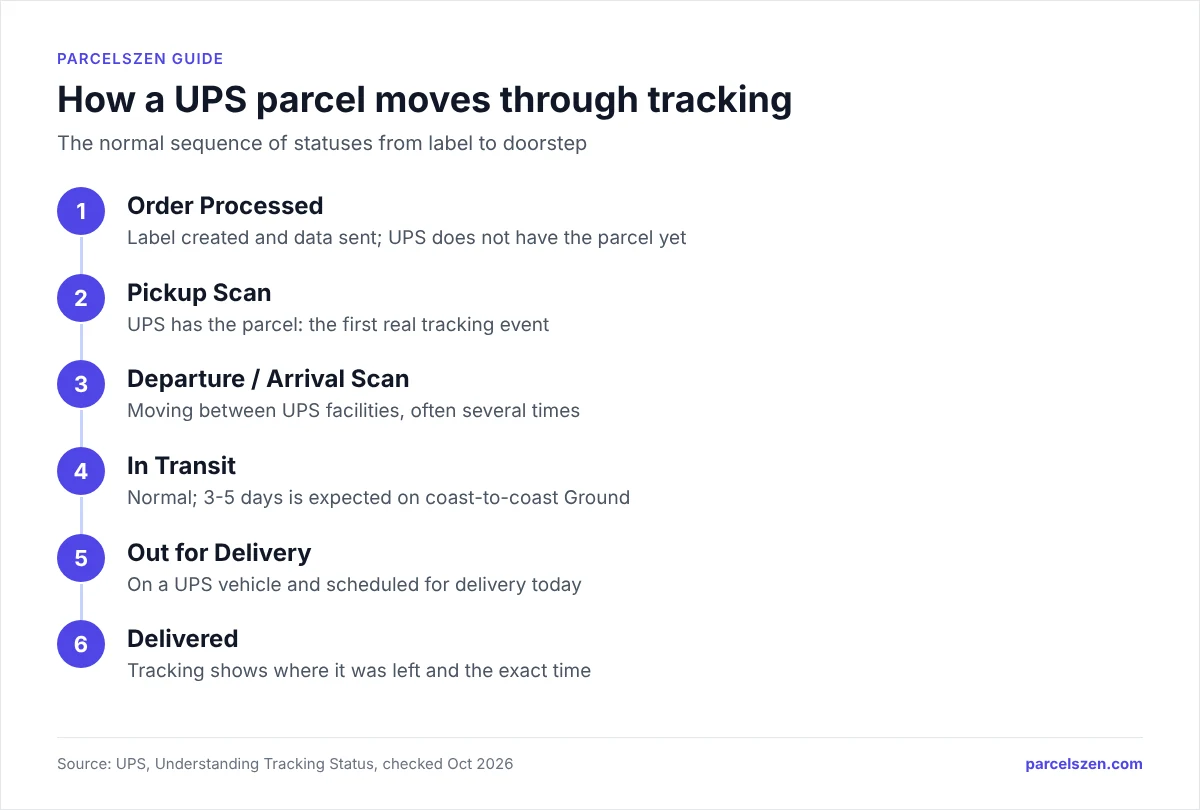
The seller has created a shipping label and submitted the shipment data to UPS, but UPS has not yet physically received the package. The package is still with the seller. The status changes once UPS scans the parcel at pickup; if it has not changed after three business days, ask the seller.
'Pickup Scan'
UPS has physically picked up the package from the sender. This is the first real tracking event and means your package is officially in the UPS system. Estimated delivery dates usually appear at this stage.
'Departure Scan'
The package has left a UPS facility and is on its way to the next facility. You will typically see multiple Departure Scans as the package moves through the network from sorting centre to sorting centre.
'Arrival Scan'
The package has arrived at a UPS facility. This alternates with Departure Scan as the package moves between sorting centres. These two statuses together confirm the package is actively progressing through the network.
'In Transit'
A general status meaning the package is moving through the UPS network toward its destination. This is normal and can persist for several days during long-distance ground shipments. Do not panic if you see this status for 3-5 days. It is expected for UPS Ground coast-to-coast shipments.
'Out for Delivery'
Your package is on a UPS delivery vehicle and is scheduled for delivery today. The tracking page shows an estimated delivery time or window when UPS provides one; otherwise it can arrive at any point on the driver's route that day.
'Delivered'
The package has been delivered. The tracking details will show the delivery location (front door, mailbox, received by person, etc.) and exact timestamp.
Track Your UPS Package Now
Enter your 1Z tracking number for UPS updates on ParcelsZen.
Track UPS PackageUPS Exception Statuses
'Delivery Attempt – No Access to Delivery Location'
The driver could not reach the delivery location (locked gate, no access to building, etc.). A delivery notice card is usually left. UPS will typically reattempt the next business day.
'Delivery Attempt – Receiver not Available or Business Closed'
A signature was required but no one was home, or the business was closed. The driver will reattempt delivery on the next business day. You can use UPS My Choice to authorize release or arrange a different delivery time.
'Address Correction Required'
The address on the package has an error. The shipper needs to correct this, or you can contact UPS with your tracking number to provide the correct address.
'Clearance Delay'
For international shipments, this means the package is waiting for customs processing. How long it takes depends on the country, the contents and whether duty is owed; check the tracking detail for any request for documents or payment.
'Weather Delay'
Severe weather has affected UPS operations in the package's route. This is temporary and delivery will resume when conditions improve. No action is required.
If you see any exception status, check the UPS tracking page or ParcelsZen for specific instructions. Many exceptions require action from either the sender or recipient to resolve.
The three clocks an exception starts
Every exception status is also a countdown, and UPS runs three separate ones with three different deadlines. Missing a deadline closes that route regardless of how good your case is, which is why the dates matter more than the wording of the status.
| What you want back | Deadline | Counted from | What you get |
|---|---|---|---|
| Shipping cost, for a late delivery | 15 calendar days | The scheduled delivery date | Transportation charges refunded |
| The parcel's value, if lost | 60 days | The scheduled delivery date | Up to $100 unless a higher value was declared (UPS terms, April 2026) |
| The parcel's value, if damaged | 60 days | The delivery date | Up to $100 unless a higher value was declared (UPS terms, April 2026) |
⏱️ Late delivery refund
📦 Lost parcel claim
💥 Damage claim
The fifteen-day window is the one people lose, because it runs from the date the parcel was supposed to arrive rather than from the day you noticed. A Next Day Air parcel that arrives three days late is still refundable on day fourteen and refused on day sixteen.
The sixty-day window behaves differently and catches people the other way. A $250 UPS parcel with no declared value that was due forty days ago and never arrived still has 20 days left to give UPS notice of the claim, with any payout capped at $100. The identical parcel seventy days after its due date has nothing: the window has closed and the claim is refused on the date alone. Nothing about the parcel changed. Only the calendar did.
UPS treats the shipper as the contract holder. If you bought from a store, you can start a claim as a guest unless the store's account blocks it, but UPS pays the store, so you still have to chase the store. Start that conversation early, because their internal process eats days you cannot get back.
Which exception starts which clock
- Delivery attempt exceptions start nothing by themselves. UPS reattempts, and the parcel is only at risk once attempts are exhausted and it heads back to the sender.
- Address correction starts nothing, but every day it sits unresolved is a day off whichever clock eventually applies.
- Clearance delay is normal on international shipments and can run several business days. It is not a loss and does not start a claim.
- Weather delay suspends the service guarantee. UPS excludes conditions beyond its control, so the fifteen-day refund route usually does not apply.
- No movement at all is the one that matters. That is when the sixty-day clock is quietly running while nothing appears to be happening.
What to Do If UPS Tracking Stops Updating
If your UPS tracking has not updated in 7 to 10 days on a UPS Ground shipment (24 hours on Next Day Air), or 10 days for an international express shipment, take these steps:
- Verify your tracking number. Check your shipping confirmation email for the exact 1Z number.
- Check for exception messages that might indicate a delay or problem.
- Contact UPS at 1-800-742-5877 if the package is past its guaranteed delivery date. Where the service guarantee applies, UPS refunds the transportation charges, but the claim has to be filed within 15 calendar days of the scheduled delivery date and is refused after that regardless of merit. Coverage is limited: as of October 2026 the UPS guarantee applies in the US only to Next Day Air Early, Next Day Air, Next Day Air Saver and 2nd Day Air A.M., plus listed Worldwide Express and Saver services, and stays suspended for UPS Ground and all other services. Check UPS's Money-Back Guarantee page before assuming a refund is due.
- Contact the seller if the package has been missing for over 7 days domestic or 21 days international and request a trace or claim investigation. UPS pays the shipper, not you, and the claim window closes 60 days from the scheduled delivery date, so raise it well before then rather than waiting to see whether the parcel turns up.
UPS Signature Requirements
Some packages require a signature upon delivery. There are three signature levels:
- Signature Required: anyone at the address can sign
- Adult Signature Required: person 21+ must sign and show ID
- Direct Signature Required: only the specific recipient can sign
If you cannot be home for a signature delivery, use UPS My Choice to redirect to a UPS Access Point location, schedule a specific delivery date, or authorize a neighbour to sign.
The three levels differ in who can accept, and that determines what happens when nobody is there. A Signature Required parcel can be left with anyone at the address, so a housemate or receptionist resolves it. Adult Signature Required narrows that to someone 21 or over who can produce ID. Direct Signature Required narrows it to the named recipient alone, which means a neighbour or family member cannot help.
The shipper chooses the level, not you, usually because of the item's value or a UPS rule. UPS requires the shipper to use Adult Signature Required on every package containing alcoholic beverages, so someone 21 or over must sign. You cannot downgrade a requirement after dispatch, though you can change where and when the delivery happens.
What to do before the attempt rather than after. UPS My Choice is free to join and lets you redirect to an Access Point or choose a delivery date (each for a fee unless you pay for Premium), or authorise a neighbour where the signature level permits it. Setting that up in advance is far easier than chasing a missed attempt, because each failed attempt costs a day and the parcel eventually returns to sender.
One thing a signature does not do: it does not extend any of the claim deadlines. A signed-for parcel that is damaged still sits under the same sixty-day window as any other.
UPS Delivery Time Windows
- UPS ground deliveries: by the end of the driver's route; check the tracking page for an estimate
- UPS Next Day Air Early: can arrive as early as 8 AM
- UPS Express Critical: any time (premium service)
UPS does NOT deliver to residential addresses on Sundays for standard services, unlike USPS and Amazon Logistics, which both offer Sunday delivery.
Frequently Asked Questions
Track Your UPS Package on ParcelsZen
Enter your 1Z tracking number on ParcelsZen for the UPS tracking updates. On a UPS Ground shipment, contact the seller after 7 to 10 days with no new scan, the threshold in our guide to tracking that stops updating.
- Order Processed: Label created, not yet with UPS
- Pickup Scan: UPS has the package, first real event
- Departure / Arrival Scan: Moving between facilities
- In Transit: Moving through UPS network, normal
- Out for Delivery: On a UPS truck today
- Exception: Issue detected, check for details
- Delivered: Package arrived at destination
Two habits cover most UPS situations. The first is to read an exception as a category rather than an emergency: delivery attempts and address corrections need a response from you, clearance and weather delays need patience, and only a complete absence of movement suggests something has actually failed. The second is to note the dates rather than the wording, because every route to getting money back runs on a calendar rather than on how reasonable your case is.
If you remember one thing from this page, make it the fifteen-day window. The sixty-day claim deadline is generous enough that most people notice a missing parcel well inside it, but the refund for a late guaranteed delivery expires quickly and runs from the date the parcel was due rather than the date you checked. On most shipments the shipper has to file it, so the conversation with the retailer needs to start in the first week, not the third.
Sources
Official pages this guide relies on, checked in October 2026.
- Understanding Tracking Status (UPS)
- Tracking Support (UPS)
- UPS Service Guarantee (UPS)
- 2026 UPS Tariff/Terms and Conditions of Service, Section 55: Claims and Legal Actions (UPS)
- Signature-Required Deliveries (UPS)
- Saturday Delivery and Pickup Options (UPS)
- Express Shipping | UPS Supply Chain Solutions (UPS)