
Managing packages across USPS, UPS, FedEx, Amazon Logistics, Royal Mail and several Chinese carriers means visiting a separate tracking website for each carrier. Packages arrive on different days, from different sellers, through different networks, and the mental overhead of remembering which number belongs to which order is the part nobody plans for.
This guide covers the methods that actually work for tracking several packages at once, and the one problem underneath all of them that most guides never explain.
The Core Problem: Package Tracking Fragmentation
USPS, UPS, FedEx, DHL, Amazon Logistics, Royal Mail, China Post and dozens of other carriers each run their own tracking site. Without a central place to check, you switch between websites constantly or lose track of which parcel is where.
ParcelsZen solves this by supporting 1,000+ carriers through our tracking data providers in one interface.
There is a second layer to the problem, and it explains most of the tracking numbers that appear to lead nowhere. The company that sold you the item is rarely the company that carries it, and the carrier that collects it is rarely the one that delivers it. International marketplace orders in particular pass through a consolidator before reaching your local postal service, and the number you were given may belong to any stage of that chain.
| Where you ordered | Who usually carries it first | Who actually delivers |
|---|---|---|
| AliExpress | Cainiao, Yanwen, 4PX or YunExpress | Your national postal service |
| Temu / SHEIN | A consolidator, then air freight | Local post or a regional courier |
| eBay international | eBay International Shipping | USPS or the destination post |
| Amazon | Amazon Logistics on its own network | Amazon Logistics, or USPS for final mile |
| Independent overseas seller | China Post, India Post or similar | Your national postal service |
🛒 AliExpress
👗 Temu / SHEIN
🏷️ eBay international
📦 Amazon
🌏 Independent overseas seller
That handoff is why a number can show movement for a week, go silent for ten days, then reappear with your local carrier. Nothing is lost during the silence. The parcel has simply left one company's system and has not yet been scanned into the next one.
Why a Tracking Number Shows Nothing
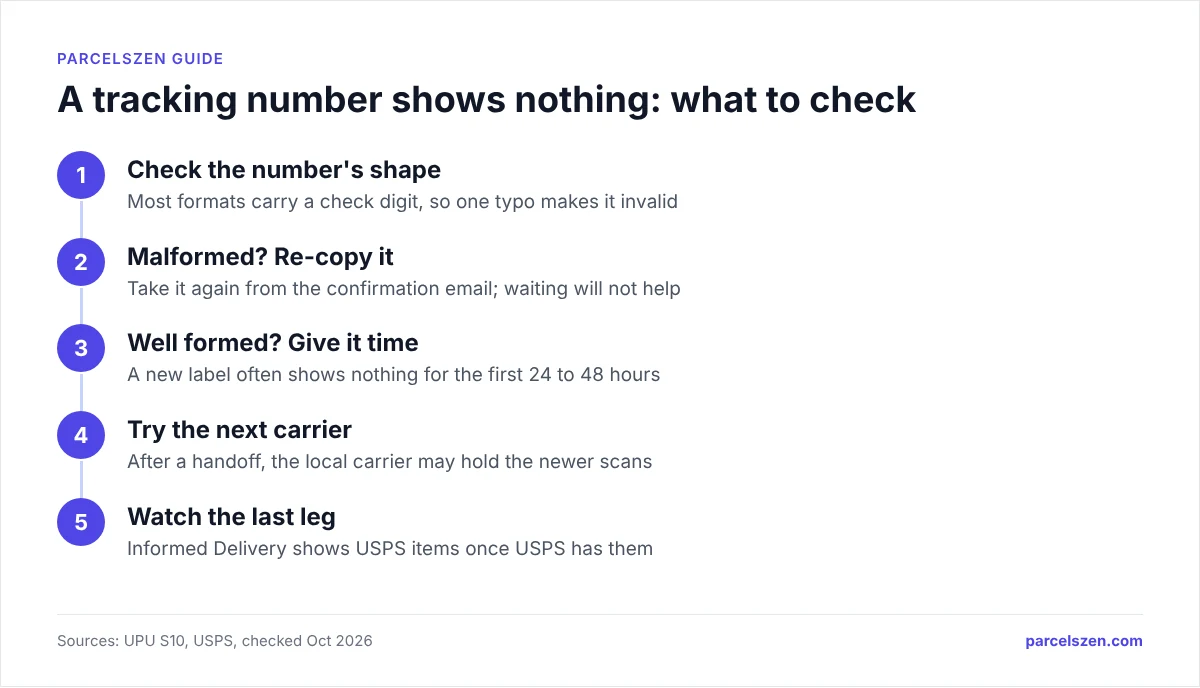
A number that returns no result looks identical whatever the cause, and the three causes need completely different responses. Working out which one you have saves the most time of anything in this guide.
- Not yet scanned into the system. The seller generated a label but the parcel has not been collected or has not reached its first sorting facility. Wait 24 to 48 hours for the first scan before you try anything else. New numbers from overseas sellers can take longer, because the first scan often happens only when the consignment reaches an export hub.
- You are checking the wrong carrier. A perfectly valid number returns nothing on a site that never handled the parcel. This is the handoff problem described above: look for a second tracking number from the destination carrier on the seller's or marketplace's tracking page.
- The number has a typo. Most tracking formats include a check digit, which means a single mistyped character makes the number structurally impossible rather than merely unknown. If a number is well formed, the problem is timing or the wrong carrier. If it is malformed, no amount of waiting will help.
The practical difference matters. A well-formed number that returns nothing needs patience or a different carrier. A malformed number needs to be re-read from the confirmation email, because it will never resolve anywhere. If you want to check what a number's format says about its carrier, our tracking number formats guide covers the patterns each carrier issues.
Using ParcelsZen for Multiple Packages
ParcelsZen saves your Recent Searches locally in your browser. This means:
- Your last 5 tracking numbers are saved automatically
- Tap any saved search to see the current status
- You don't need to re-enter tracking numbers you've checked before
- The carrier is identified from the number itself, so you do not need to know who is carrying the parcel before you look it up
For power users managing many orders, this provides a quick list of recent tracking numbers without any account registration required.
Track All Your Packages on ParcelsZen
Paste a tracking number to see the carrier's tracking updates. Your last 5 searches stay in this browser.
Track Your PackagesThe practical advantage is that you stop needing to know which company holds the parcel. Paste the number, and the tracker identifies the carrier. You are not required to guess correctly before you can check.
When a consolidator hands a parcel to your local post, the original tracking page often stops updating while the destination carrier's page starts. If the first number stops updating, look on the seller's tracking page for a second number from the destination carrier and enter that one as well.
USPS Informed Delivery: The Best Free Multi-Package Tool for USPS
USPS Informed Delivery is a free service that sends you a daily email showing all USPS mail and packages scheduled for delivery that day.
- Signing up: Go to informeddelivery.usps.com and create a free account
- Benefits: See all incoming USPS packages before they arrive. Preview mail images. Set up text or email notifications.
- Limitation: Only covers USPS, not UPS, FedEx, or other carriers
One point worth knowing given the handoff table above: many international parcels finish their journey with USPS even when they started with a Chinese consolidator, so Informed Delivery often catches overseas orders on their final day without you doing anything.
What it does not cover is the gap that matters most. Informed Delivery only sees mail once it is inside the USPS network, so an international parcel is invisible to it for the entire overseas leg. On a China order that can be three weeks of nothing, followed by a sudden appearance once it clears customs and is handed over.
It is also mail-piece based rather than order based. A single order that ships as three parcels appears as three unrelated items with no indication they belong together, which is the exact problem a multi-parcel tracker exists to solve. Treat it as a useful last-mile confirmation rather than a tracking system.
Email Inbox as Your Package Dashboard
Your email inbox is an underrated tool for tracking multiple packages:
- Create a 'Shipping' folder or label in Gmail or Outlook and filter all shipping confirmation emails into it
- You'll have all your tracking numbers organized in one place
- Use Gmail search 'tracking number' to quickly find all active shipment emails
Set up a Gmail filter: search for emails containing "tracking number" or "your order has shipped" and automatically apply a "Packages" label. All shipping emails land in one folder.
The deeper problem is that retailer emails describe the order, not the parcel. A confirmation says your items shipped; it rarely says they shipped in two boxes on different dates with different carriers. By the time you notice that the second box never arrived, the retailer's window for reporting it may already be tight.
Marketing volume makes it worse. Shipping notifications arrive from the same sender address as promotions, so filters bury them or you stop opening them. If you rely on email at all, set a rule that moves anything containing a tracking number into its own folder, and check that folder rather than the inbox.
Email works as a record of what was ordered. It is a poor instrument for knowing where anything currently is.
Spreadsheet Method for Heavy Shoppers
If you regularly have 10 or more packages in transit, a simple spreadsheet works well:
- Columns: Order date, seller, item description, carrier, tracking number, expected delivery, status
- Update status weekly or when you check packages
- Google Sheets (free) works well and is accessible from any device
Two columns are worth adding that most people leave out. A last movement date tells you at a glance which parcels have gone quiet, which is the only signal that separates a delayed parcel from a lost one. And a claim deadline column matters because the windows differ by carrier and by problem (as of October 2026): USPS takes claims for a lost Priority Mail or Ground Advantage parcel from 15 to 60 days after mailing, UPS within 60 days of the scheduled delivery date, and FedEx within 60 days of shipping for damage in the US and within nine months for a lost parcel. A claim filed after the window closes is refused.
USPS, UPS, FedEx Apps: Native Tracking on Mobile
All three major US carriers have dedicated mobile apps:
- USPS Mobile: Scan package barcodes, save tracking numbers, get notifications
- UPS Mobile: My Choice integration, real-time notifications, delivery management
- FedEx Mobile: Delivery Manager integration, package management
If most of your parcels come with one carrier, its app or free account (UPS My Choice, FedEx Delivery Manager) also lets you change a delivery, which a tracking site cannot do. For parcels spread across carriers, paste each number into ParcelsZen.
Third-party apps:
- Deliveries (iOS): subscription app for iPhone, iPad, Mac and Apple Watch that lists deliveries from many carriers and notifies you on the expected day (as of October 2026)
- Shop by Shopify (iOS/Android): Shopify's app for iOS, Android and web that tracks your packages in one place (as of October 2026)
Carrier apps share one blind spot worth planning around. Each shows only its own network, so a parcel that starts with an overseas consolidator and finishes with your local post appears in the destination carrier's app only after the handoff completes. Until then the app reports nothing, even though the parcel is moving normally.
Frequently Asked Questions
Quick Summary: Best Multi-Package Tracking Methods
For multi-carrier tracking without accounts or apps, ParcelsZen supports 1000+ carriers with automatic recent search saving. USPS Informed Delivery is the one additional tool worth setting up, because the daily email covers every USPS parcel without you checking anything.
- ParcelsZen: 1000+ carriers, saved recent searches, no account needed
- USPS Informed Delivery: Free daily email for all USPS packages, informeddelivery.usps.com
- Gmail Shipping folder: Filter all shipping emails and search "tracking number"
- Spreadsheet (10+ packages): Google Sheets with carrier, tracking number, expected delivery, last movement date and claim deadline
- Carrier apps: USPS Mobile, UPS Mobile, FedEx Mobile for single-carrier power users
- Third-party apps: Deliveries (iOS premium), Shop by Shopify
- Before you panic about a silent number: check whether it is unscanned, on the wrong carrier, or mistyped
Sources
Official pages this guide relies on, checked in October 2026.
- Informed Delivery - Mail & Package Notifications | USPS (United States Postal Service)
- eBay International Shipping is here | Announcements | eBay Community (eBay)
- eBay International Shipping | eBay (eBay)
- File a Claim | FedEx (FedEx)
- USPS Tracking® (United States Postal Service)
- Identification of postal items – 13-character identifier (S10-12) (Universal Postal Union)
- Create rules to filter your emails - Gmail Help (Google)