
USPS, UPS and FedEx each run a free notification service for the people receiving parcels. UPS My Choice sends delivery alerts and photos. FedEx Delivery Manager lets you redirect packages from your phone. USPS Informed Delivery emails you each morning a package is due. All three are free to join, but UPS can take 7 to 14 days to verify a new member by post.
Enter any tracking number on ParcelsZen for tracking status, or use the carrier notification systems below to get proactive alerts without checking at all.
How Much Warning Each One Actually Gives
Most delivery notifications fire at the delivery scan, which is the moment the parcel is already sitting on your step. That is useful for a record and useless for anything else. The alerts worth setting up are the ones that reach you before the van does.
| System | Earliest warning | How precise |
|---|---|---|
| Amazon app | Minutes | Live map, stops away, on the day |
| UPS My Choice | The day before | Estimated time. Confirmed 2-hour windows cost a fee per request |
| FedEx Delivery Manager | The day before | Estimated window on the day |
| USPS Informed Delivery | Before 9am, same day | What is expected today. No live position |
| Retailer emails | Usually after the scan | None. It tells you it arrived |
⏱️ Minutes of warning
📅 A day of warning
🌅 A morning of warning
The gap that costs people parcels
A day of warning is worth far more than a minute of it. Minutes let you walk to the door if you happen to be home. A day lets you reschedule, divert to a collection point, or ask a neighbour, which are the actions that actually prevent a parcel sitting outside for six hours.
That inverts the usual ranking. Amazon's live map is the most impressive of these systems and the least useful for prevention, because by the time the van is three stops away your options are gone. UPS and FedEx give you the least exciting alert and the most useful one.
Set them up before you need them
Carrier accounts need verifying before every option works: UPS My Choice keeps Delivery to Another Address locked until your membership is verified. USPS text alerts are the exception, because you can turn them on for one tracking number at any time. UPS My Choice may require an activation code sent by post, which arrives roughly seven to fourteen days after you enrol. FedEx and USPS verify identity too, though usually faster.
That verification delay is why many people enrol too late to help with the parcel they are worried about. They discover them while worrying about a specific parcel, start the process, and the code arrives long after that parcel has been delivered or stolen. Enrol on a quiet day when nothing is on its way.
USPS Text and Email Notifications
USPS offers free delivery notifications via text or email through three methods:
Method 1: Informed Delivery
Sign up at informeddelivery.usps.com. You'll receive a daily email with images of incoming mail and packages expected that day.
Method 2: Track and Confirm Text Alerts
Text your USPS tracking number followed by a space and AF to 28777 (2USPS). You'll get text updates as the package moves through the network.
Method 3: Online Tracking with Notification
Go to usps.com/tracking, enter your tracking number, scroll down, and select 'Email Updates'. Enter your email to receive status updates for that specific package.
The Daily Digest arrives before 9am local time and tells you what is expected that day, which is the single most useful thing this service does. It is not live tracking and it will not tell you the van is nearby, but knowing a parcel is due today changes whether you go out.
Mail images and package status are two different features. The scanned images cover letter-size mail processed by automated equipment, so catalogues, magazines and large envelopes frequently do not appear. Package tracking is pulled separately from the USPS tracking network and shown alongside.
Two settings are worth switching on once you are enrolled. Mail Delivery Notification emails tell you when the day's mail has been delivered, and a registered digital signature lets you sign online for eligible items that need a signature (USPS names Priority Mail Express, Signature Confirmation and items insured for over $500), so the carrier can deliver them while you are out.
UPS My Choice: The Best UPS Notification System
UPS My Choice is a free service that provides detailed delivery notifications and package management. Sign up at ups.com/mychoice.
Features:
- Email and/or text delivery alerts
- Delivery photo confirmation
- Ability to redirect packages to UPS Access Points
- Authorization to leave package without signature
- Reschedule delivery to a different day
Setup: Create a UPS account → enroll in My Choice → set notification preferences for email, text, or both.
Track Any Package Right Now
Enter your tracking number on ParcelsZen for carrier-identified status updates.
Track Your PackageThe day-before alert is the reason to have this. It arrives the evening before delivery, which is the only point at which you still have every option: reschedule, divert to an Access Point, leave instructions or arrange a neighbour. Nothing else on this page gives you that much room.
Be clear about what the free tier includes. Basic membership covers alerts, delivery photos, instructions and rerouting. A confirmed two-hour delivery window costs a fee for each request, and Premium membership ($19.99 a year as of October 2026) includes two free requests a year, so treat the estimated time as an estimate rather than an appointment.
Access Point holding is the underused part. A member can have a parcel held at a UPS Store or Access Point for up to seven calendar days at no charge, and at a customer centre for five business days. For anything valuable, diverting from the day-before alert is more effective than any measure taken at your door.
FedEx Delivery Manager
FedEx Delivery Manager is similar to UPS My Choice, and it is free and highly recommended. Sign up at fedex.com/deliverymanager.
Features:
- Customize delivery window
- Get text/email delivery alerts
- Redirect packages free to a retail location such as Walgreens, FedEx Office or Dollar General
- Request hold for pickup
- Sign for packages digitally in some cases
Delivery Manager works on the same day-before rhythm as UPS, with an alert the evening prior and an estimated window on the day. The practical difference is in what you can change and how often.
Check the fee before you redirect. Redirecting to a FedEx retail location is free, but sending the parcel to another residential address within 120 miles starts at $5.55 per package as of October 2026, and the fee varies by location. Choose the destination before you make the change.
Vacation holds are the feature people forget. Setting a hold in advance stops parcels arriving while you are away rather than leaving them on a step for a week, and it costs nothing. It is more useful than any camera for the specific case of a planned absence.
Amazon Delivery Notifications
Amazon provides notifications through multiple channels:
- Amazon app: Push notifications when shipped, out for delivery, and delivered
- Email notifications at each stage
- Alexa: 'Alexa, where's my package?' works for Amazon orders
- SMS: Amazon can send text alerts, configured in Account → Notifications
Amazon gives the most precise tracking and the least useful warning. The live map showing how many stops away the driver is arrives when the van is already on your street, so it tells you when to walk to the door and nothing more. There is no rescheduling left at that point.
Where Amazon is genuinely strong is the delivery photo. Drivers photograph most unattended deliveries and the image appears on the order page, which resolves a large share of missing-parcel cases in seconds by showing a side door or a neighbouring property you had not checked.
Turn on the day-before notification separately. Amazon defaults to out-for-delivery and delivered alerts, and the arriving-tomorrow setting sits in notification preferences rather than being on by default. That one is the setting worth having, for the same reason it matters on UPS and FedEx.
DHL Notifications
- DHL Express: Sign up for On Demand Delivery at dhl.com to track and manage DHL packages. Set email or SMS alerts for all tracked shipments.
- DHL eCommerce: Less sophisticated, typically email notifications from the sender platform (AliExpress, etc.) with DHL tracking info embedded.
DHL On Demand Delivery is the notification system worth using, and it is separate from ordinary tracking emails. It lets you redirect to a neighbour, a service point or a different day before the first delivery attempt rather than after a failed one, which is where its value sits.
Availability depends on which DHL has your parcel. DHL Express shipments are well covered. DHL eCommerce parcels frequently transfer to a local postal operator partway, and once that handover happens the DHL notification stops and the destination carrier's system takes over, if it notifies at all.
Check the tracking number before assuming it applies. A ten digit number is Express and On Demand Delivery will work. Anything longer, or ending in a country code, is likely to be an eCommerce or postal shipment where those controls are not available.
Third-Party Notification Apps
- Deliveries (iOS): Premium app that consolidates all tracking in one place with push notifications
- Shop (iOS and Android): App from Shopify that tracks your packages in one place
The advantage of a third-party tracker is that it needs no account with each carrier, which removes the enrolment delay entirely. Paste a number and it identifies the carrier and follows it, including parcels that change hands between carriers mid-journey.
The trade-off is control. An aggregator can tell you where a parcel is, but it cannot reschedule a delivery, divert to an access point or leave instructions for the driver. Those actions require a carrier account, because they change what the carrier does rather than what you see.
The sensible combination is both. Carrier accounts for the three networks that deliver most of your parcels, so you keep the ability to redirect, and an aggregator for everything else, so an unfamiliar international number does not need a new account at nine in the evening.
Pro Tip: Gmail Filters for Shipping Emails
Set up a Gmail filter to automatically label all shipping confirmation emails:
- Search for:
from:(ups.com OR fedex.com OR usps.com OR amazon.com) subject:(tracking OR shipped OR delivered) - Apply label 'Packages' and skip inbox
- All shipping emails are organized in one folder, easy to find when you need a tracking number
Frequently Asked Questions
Quick Summary: Delivery Notification Setup by Carrier
For multi-carrier tracking without accounts, ParcelsZen covers 1,000+ carriers through our tracking data providers with no registration needed. Recommended: activate UPS My Choice + FedEx Delivery Manager + USPS Informed Delivery. Once those three are live, you get alerts for USPS, UPS and FedEx parcels addressed to you.
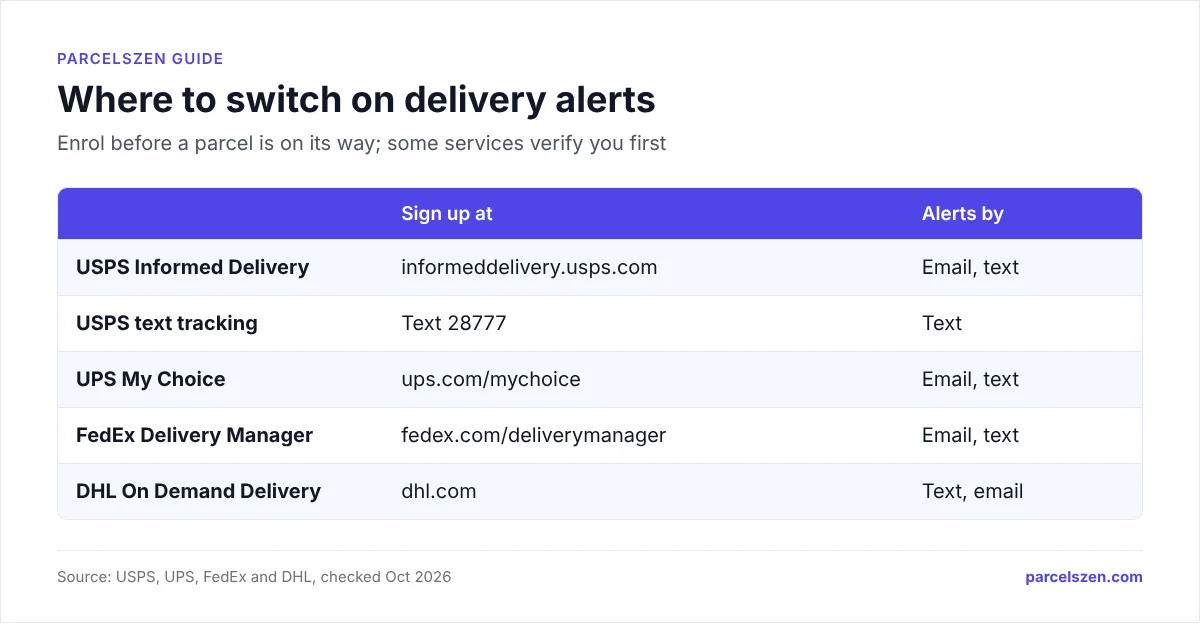
- USPS text: Text tracking number to 28777
- USPS email: usps.com/tracking → Email Updates
- USPS Informed Delivery: informeddelivery.usps.com, free daily digest
- UPS: ups.com/mychoice, free, email and text delivery alerts
- FedEx: fedex.com/deliverymanager, free, same features as UPS
- Amazon: Amazon app push notifications + Alexa voice
- DHL: dhl.com On Demand Delivery, email or SMS for Express
- Gmail filter: Label all shipping emails into one "Packages" folder
The ranking that matters is by warning, not by features. UPS My Choice and FedEx Delivery Manager give you a full day, which is the only amount of notice that lets you change anything. USPS Informed Delivery gives you a morning, which tells you to expect something. Amazon's live map gives you minutes, which is impressive and too late to act on.
Enrol on a quiet day. The verification step on UPS can take one to two weeks by post, and nobody sets these up in advance because nobody thinks about parcels until one is late. Doing it now is the whole difference between having the option and reading about it.
Sources
Official pages this guide relies on, checked in October 2026.